Icon of program: Virtual CloneDrive

Virtual CloneDrive for Windows

  • Free
  • 3.9
    959
  • 1.1M
  • V5.5.3.0
Free Download for Windows

View an ad to download for free

Chantelle van Heerden

Updated 2 months ago

Free software to mount ISO image files

Virtual CloneDrive is a free utility tool that allows users to mount disc image files as CD, DVD, or Blu-Ray drives. The drive exists virtually, and it supports all common image formats, including ISO, BIN, IMG, UDF, DVD, and more. You can run any of these disc images simultaneously in up to 15 drives.

Top Recommended Alternative

Once mounted using Virtual CloneDrive, the file appears in Windows Explorer like a physical optical drive. It’s useful for things like installing games distributed as ISO files, accessing archived disc backups, running Blu-ray or DVD images without burning discs, and many more useful features.

Simplify the mounting process

Virtual CloneDrive allows you to mount ISO and various other disc image formats, creating virtual CD, DVD, and Blu-ray drives right within Windows. It's ideal for accessing archived software, vintage games, or large disc backups. Since many older PC games and programs were distributed on CDs and DVDs, this tool makes it easier to run them without needing external hardware.

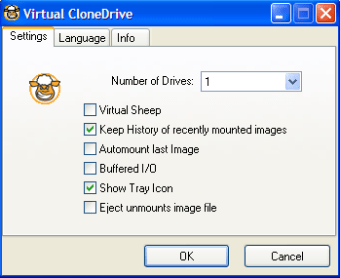
While the software gives an option to run ISO files, it doesn’t support the creation of such files, meaning you can’t burn a virtual CD or DVD using this software. Its functionality remains limited if you look at it. One feature worth mentioning is its automount feature, which remounts the last used image and also stores all recently mounted files for convenience.

One of the best things about this software is that it’s completely free, with no in-app purchases or subscriptions, unlike many other apps today. It has a simple interface and runs smoothly on all types of hardware, whether it's low-end or high-end. Additionally, the setup is straightforward, offering clear step-by-step instructions, and doesn’t take long before you’re ready to start using it.

A handy tool you can’t miss

If you regularly work with ISO and disc image files, Virtual CloneDrive is definitely a must-have tool as it simplifies the whole mounting process. With support for multiple virtual drives, it is useful for multitasking or older games that require multiple discs. Moreover, it supports all common image formats and offers splendid features like eject, auto-mount, and recent files reload.

Chantelle van Heerden

With over 12 years in marketing and project management, she has led digital campaigns, events, and design projects for international clients. Alongside her agency work, she has contributed written content across multiple formats, combining professional expertise with a passion for communication and creative storytelling.

  • Pros

    • Supports up to 15 virtual drives
    • Supports common image formats
    • Easy setup process
  • Cons

    • Cannot burn virtual disc images
    • Mostly focused on disc mounting only
 0/2

App specs

  • Developer

  • License

    Free

  • Version

    5.5.3.0
  • Latest update

  • Platform

    Windows

  • OS

    Windows Vista

  • Language

    English

    Available languages

    • Czech
    • Danish
    • German
    • Greek
    • English
    • Spanish
    • French
    • Italian
    • Dutch
    • Norwegian
    • Polish
    • Portuguese
    • Swedish
    • Chinese
  • Downloads

    1.1M

    Last month's downloads

    • 2.7K
  • Size

    1.80 MB

Program available in other languages


Icon of program: Virtual CloneDrive

Virtual CloneDrive for PC

  • Free
  • 3.9
    959
  • 1.1M
  • V5.5.3.0
Free Download for PC

View an ad to download for free


User reviews about Virtual CloneDrive

3.9

7 reviews

Add review

Main reviews for you

  • Anonymous user

    Sempre usei e acho maravilhos. Extremamente útil. Deve, IMHO, ser instalado em todos os computadores windows.

  • Anonymous user

    Wish i could to say it too. ..i have this program on my PC, but my experience unfortunaly if i said more, it's none...every time i wanted to run it or some how to work in, the program note me insert the disc..loli'm not a PC Guru, but maybe can you advice how to learn to use it..P.S. notebook has not cdDriver

  • Anonymous user

    Excellent tool. I use it for years without any problem, very useful, freeware! It's my replacement for Daemon Tools.... Pros: Easy to use, stable, freeware... Cons: nothing!

  • Anonymous user

    Excellent tool. It did exact what it has to do! Check the settings once when it is installed. Simple, clean, fast, no bugs... run on XP SP3, Win7x86 and Win7x64.Think about donation.

  • Anonymous user

    Virtual clonedrive does nothing. it did absolutely nothing, there are no instructions you cant get anything to happen I dont understand. screw this dont waste your time. Pros: none Cons: nothing works, it just sits on your desktop and doesnt work.

  • Anonymous user

    Virtual Clone Drive just sits there. I tried or at least attempted to install this program on an XP SP3 system and a Vista system. Neither one did anything more than display the settings window and allow me to mount an ISO. The ISO would not perform on either system. I used NERO's image drive on the same iso and it played perfectly.Not much good if all it does is display a couple of dialogue windows and let you toggle a program on and off - mount/dismount the system,. Mount for what? Oblivion. The same image file worked beautifully on NERO's Image Drive so it isn't corrupt.

More

You may also like

Alternatives to Virtual CloneDrive

Explore Apps

Related Articles

Latest articles

Laws concerning the use of this software vary from country to country. We do not encourage or condone the use of this program if it is in violation of these laws.
Softonic

Is Virtual CloneDrive safe?

99/100

Score result: Clean

This file passed a comprehensive security scan using VirusTotal technology. It is safe to download.

  • Virus free
  • Spyware free
  • Malware free
  • Verified by Security Partners

    VirusTotal logo

Scan Info

Last scan
Friday, March 7, 2025
Scan provider
VirusTotal · Full report

File Integrity

File
Virtual_CloneDrive_V5.5.3.0.exe
SHA256
c676e1cad4d505e3511715efc3be72617053dfb08812e24e0706238be6b8c627
SHA1
fdf8138be1066c829dec6866a1f5ab12d005b3fc

Softonic security commitment

Virtual CloneDrive has been thoroughly scanned by our advanced security systems and verified by industry-leading partners. This file comes from the official developer and has passed all our security checks, showing no signs of viruses, malware, or spyware. For more information, visit our Security and Trust Center

Signed in to Softonic as